Launchpad Scheduler - Error When Editing Scheduler
Error Caused by Account Settings Id or Password
If the Account id/password are not setup correctly the end user could get the following message when trying to add new tasks.
To Fix this make sure the account id and password are correct. File->Task Scheduler Account Settings
Make sure it is set to SynergyWebServices
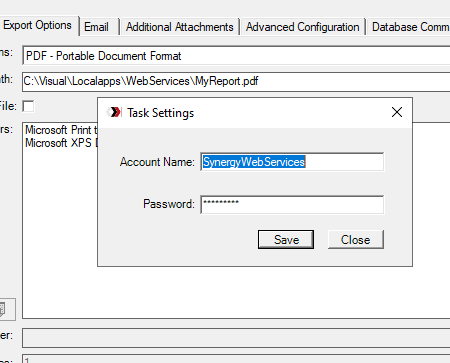
Make sure it is set to SynergyWebServices
Task Issues
If the Windows Task Scheduler job is set to an older version of Windows, this error can be resolved by setting it to the actual version.
Related Articles
Launchpad Scheduler - some settings are incompatible with this selection error
If you get this error, edit the Schedule in Windows Task Scheduler and fix the Configure for value to match the server OS:Launchpad Scheduler - User Guide
Launchpad Scheduler Guide In this guide the steps for creating a Basic Scheduled Report job as well as advanced Configuration Crystal Reports SAP has announced that Dec 31, 2027 Crystal Reports (.dll's) will no longer be supported by SAP. Please note ...Launchpad Updater 530 Not logged in Error
Older versions of Launchpad may receive this error when trying to update: Download this and deploy to the Launchpad root directory (overwriting what's there) to correct this. WebAppUpdateUtility.exe and WebAppUpdateUtility71x.exe are obsolete and ...SmartViews Scheduler - User Guide
PREREQUISITES Supported Visual version are 7.0 – 11.x Database Platform: SQL Server & Oracle Microsoft .Net Framework 4.8 ADMINISTRATION LICENSING Request for a license key can be made via email. Send your request to CustomerCare@wm-synergy.com and ...SmartViews Scheduler - Release Notes
v1000.1507 (4/24/2024) CustomAppointmentForm - Set the selected tab page as SmartView, and then quickly switch back to Event on Shown event (Thanks Jarred) - this will make the FilterEditor control load (Filter Editor doesn't load unless it is ...